11.09 Summary and Homework Copy
These exercises aim to check if you know how to build model checking rules in Solibri.
All files required to complete these tasks, you can download here – Download
Challenge 11.1 – Hospital project
1. Create a federated model in Solibri using provided models which can be found in folder 11.1_IFC_Models. Save the file as 11.1_Hospital.smc
2. Now, your task is to perform a model check. You need to check:
- Intersections between:
– HVAC ducts vs structural beams of type W21x50
– HVAC ducts vs structural columns of type W14x176 and W14x120 - Intersections between: plumbing pipes vs doors and windows
- That doors are located on the same floor as the wall they are related to.
- That there is 1m clearance in front of doors with any electrical model elements
- That structural columns have a maximum of 10m in length.
- Intersections between:
Hint: First you need to build proper rules in Ruleset Manager and then use them in the Checking layout to conduct a model check.
3. After the check, create at least 15 issue slides (at least 3 issues for each discipline).
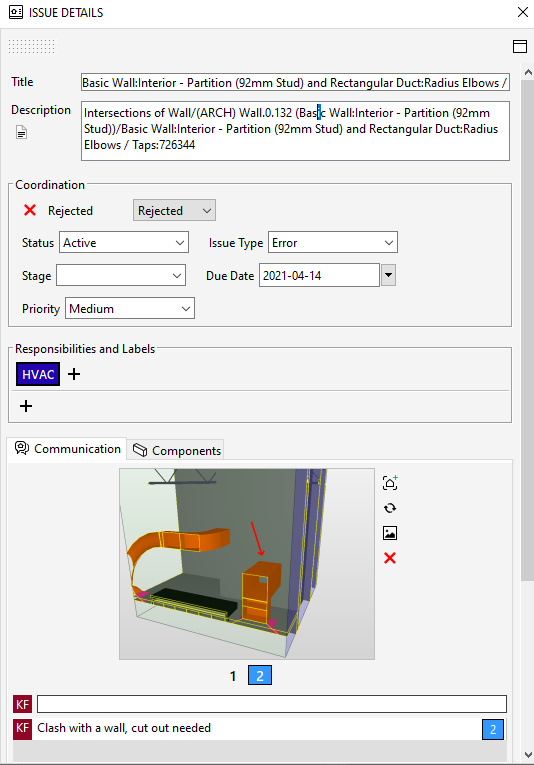
4. Each issue slide needs to contain the following information:
- Issue description,
- Status,
- Priority (use High, Medium, Low severity values),
- Responsible party (you can use discipline abbreviation: ARC – architecture, STR, PLUM, ELEC, HVAC),
- Minimum 2 slides. One of them needs to contain any type of markup,
- Comment,
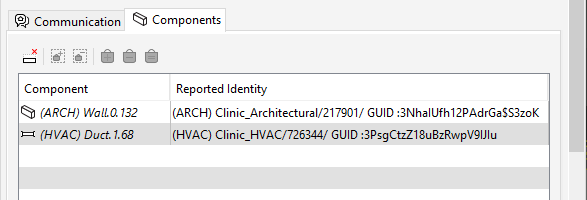
- Under the Components tab, there needs to be at least 1 model component that is associated with this issue.
Here is a sample of properly defined issue slide:
5. After you finish model check and you have your issue slides ready, please save the file. This file will be used in module 12 in challenge 12.1.
Challenge 11.2 – School project
1. Create a federated model in Solibri using provided models which can be found in folder 11.2_IFC_Models. Save the file as 11.2_School.smc
2. Adjust ruleset – 11.2_BBC_Ruleset.cset so it will check only model elements located in Zone B and Zone C of the building. What’s more, it needs to check only elements that have a status code value set to SC-30. (Zone and Status Code parameters are located in the BBC_Process property set).
3. Using adjusted ruleset, run a model check. After the check, create at least 15 issue slides (at least 3 issues for each discipline). You decide which issues you want to create.
4. Each issue slide needs to contain the following information (see the picture above as a reference):
- Issue description,
- Status,
- Priority (use High, Medium, Low severity values),
- Responsible party (you can use discipline abbreviation: ARC – architecture, STR, PLUM, ELEC, HVAC),
- Minimum 2 slides. One of them needs to contain any type of markup,
- Comment,
- Under the Components tab, there needs to be at least 1 model component that is associated with this issue.
5. After you finish model check and you have your issue slides ready, please save the file. This file will be used in module 12 in challenge 12.2.
REMEMBER – IF YOU HAVE ANY DIFFICULTIES WITH THESE CHALLENGES, GO TO OUR COMMUNITY GROUP AND WRITE THERE A POST EXPLAINING WHAT YOU DON’T UNDERSTAND. THIS IS THE FASTEST WAY TO GET HELP FROM ME (IGNACY ) AND FROM OTHER BBC STUDENTS. GOOD LUCK.