09.19 Summary and Homework Copy
Various IFC Guides and Manuals:
1. IFC Guide for Revit
2. Revit IFC Manual
3. IFC Exchange Best Practices
4. IFC Reference Guide for Archicad
5. Exporting IFC from Archicad – BIM Corner
6. Exporting model from Tekla Structures to IFC- BIM Corner
7. Revit IFC Manual 2.0
SOLUTION VIDEOS
Try to solve the exercises on your own. However, if you encounter difficulties, solutions are available below the challenges section.
09.19 – Challenge 1
These exercises aim to check if you know how to export IFC files from Revit in a proper way.
Tip: Check lessons from 09.03 to 09.06 to get the job done correctly.
All files needed to complete these tasks you can download here – Download
Challenge 1.1
1. Open 09.19-ARC_model file in Revit from Challenge 1.1 folder
2. Export the IFC model to IFC 4 version so that the model DOES NOT contain door elements and columns.
3. Do it in 2 different ways:
a. First, using the IFC mapping table,
b. As for the second way, think for yourself how it can be done without the use of an IFC mapping table
Challenge 1.2
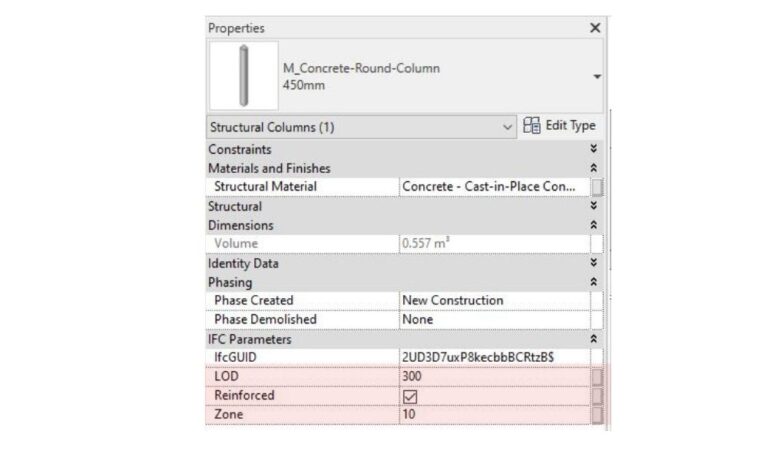
2. Export this model to IFC 2×3 file. In the Revit file, each structural column contains 3 specific properties LOD, Reinforced, and Zone. (check the picture below)
3. These parameters have to be located in the IFC file, in a property set called BC_Property_Set
4. These parameters in the IFC file need to have a prefix “BC” added to the name, so BC_LOD, BC_Reinfored, and BC_Zone
5. Use parameter mapping file – 09.19-ParameterSets.txt (file located in Challenge 1.2 folder ) in order to export these properties to IFC.
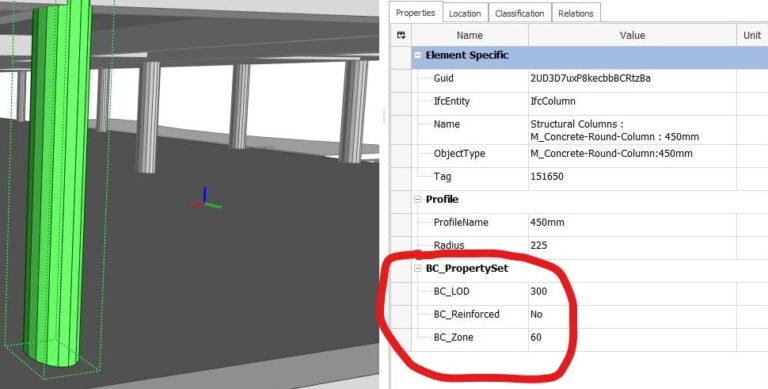
6. As a final result, by clicking on the column, you should get such parameter structure:
09.19 – Challenge 2
These exercises aim to check if you know how to use Solibri to create filters and Information Takeoff’s.
Tip: Check lessons from 09.15 to 09.18 to get the job done correctly.
All files needed to complete these exercises you can download here – Download
If you want to check if you’ve done the exercise correctly, you can compare your results with correct answers.
Challenge 2.1
1. Open 09.19-STR_model.ifc file located in Challenge 2.1 folder
2. Build a filter in Solibri that will filter only these structural columns that are reinforced.
TIP: To know which column is reinforced find the right parameter in the “BC_PropertySet” property set.
3. How many of these columns are in this model?
Challenge 2.2
1. Download and open model – BBC_Hospital.smc file.
2. Build proper Information Takeoffs to answer these questions:
2.1 How many cubic meters of material: Steel – ASTM A992 is used in the Structural model?
2.2 How many doors in the Architectural model are single doors that swing to the LEFT?
2.3. How many toilets are in the Plumbing model?
Challenge 1.1 – Solution
Challenge 1.2 – Solution
Challenge 2.1 – Solution
Challenge 2.2 – Solution
REMEMBER – IF YOU HAVE ANY DIFFICULTIES WITH THESE CHALLENGES, GO TO OUR COMMUNITY GROUP AND WRITE THERE A POST EXPLAINING WHAT YOU DON’T UNDERSTAND. THIS IS THE FASTEST WAY TO GET HELP FROM ME (IGNACY ) AND FROM OTHER BBC STUDENTS. GOOD LUCK.