14.13 Summary and Homework Copy
Practical assignments:

This exercise aims to test if you know how to check the model in Navisworks using the Clash Detective tool.  

All files required to complete these tasks, you can download here – Download

Challenge 14.1 – Hospital project

1. Create a federated model in Navisworks using provided models which can be found in folder 14.1_Models. Save the file in the same folder as NWF file – 14.1_Hospital.nwf 

2. Build a clash test in the Clash Detective tool that will check:
Intersections between:

  • HVAC ducts vs structural beams of type W21x50,
  • HVAC ducts vs structural columns of type W14x176 and W14x120,
  • Plumbing pipes vs structural slabs,
  • Plumbing pipes vs doors and windows,
  • Electrical model vs Plumbing fixtures and Plumbing pipes.

Hint: First you need to build proper search sets and then use them in the Clash Detective layout to conduct a model check.

3. From the Clash Results, pick at least 10 single clashes and also create at least 5 clash groups. These groups need to gather clashes that have something in common (for example: are located near each other or on the same floor),

4. Give a meaningful name to each clash group and single clash,

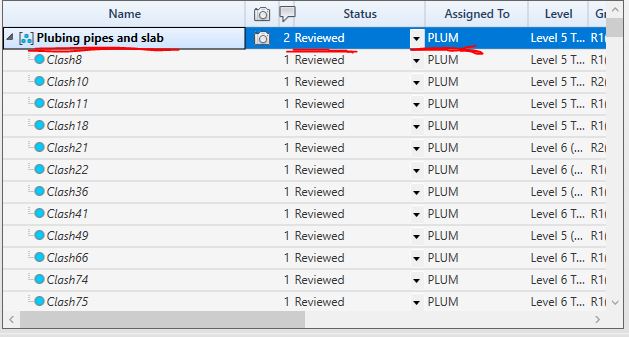
5. Add the following information to every single clash/clash group:

  • Change their status to Reviewed,
  • Assign a proper responsible team (you can use discipline abbreviation: ARC – architecture, STR, PLUM, ELEC, HVAC),
  • Add a comment,
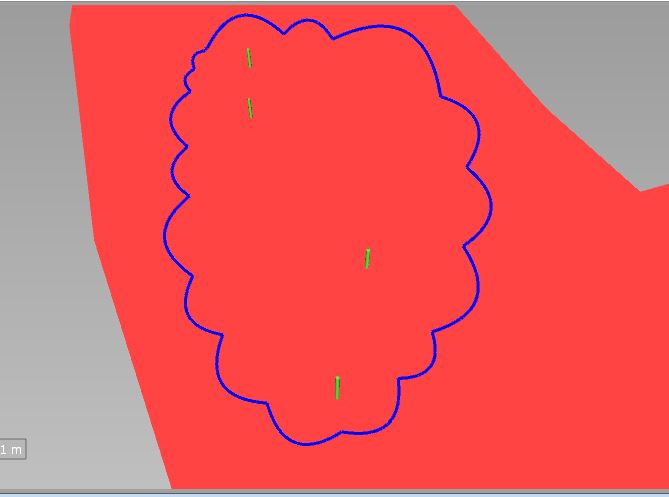
  • If needed add revision clouds or other markups which will describe issues better.

Here is a sample of a properly defined clash group that meets the above-mentioned requirements:

6. After you finish the model check and you have your clashes ready, please save the file. This file will be used in module 15 in challenge 15.1.

Challenge 14.2 – School project

1. Create a federated model in Navisworks using provided models which can be found in folder 14.2_Models. Save the file in the same folder as NWF file 14.2_School.nwf 

2. Create ignore rules in Clash Detective, that will exclude elements located in Zone A of the building. 

3. Create ignore rules in Clash Detective that will exclude elements that have Status Code other than SC-30

Hint: Zone and Status Code parameters are located in the BBC_Process property set.

4. Build Clash Tests that will check if there are clashes between:

  • HVAC model vs Architectural Interior walls,
  • HVAC model vs Structural Walls and Slabs, 
  • HVAC model vs Structural beams and columns,
  • Plumbing fixtures vs HVAC model,
  • Electrical fixtures vs Architectural ceiling.
Hint: First you need to build proper search sets and then use them in the Clash Detective layout to conduct a model check.

5. From the Clash Results, pick at least 10 single clashes and also create at least 5 clash groups. These groups need to gather clashes that have something in common (for example: are located near each other or on the same floor).

6. Give a meaningful name to each clash group and single clash.

7. Add the following information to every single clash/clash group (see the picture above as a reference):

  • Change their status to Reviewed,
  • Assign a proper responsible team (you can use discipline abbreviation: ARC – architecture, STR, PLUM, ELEC, HVAC),
  • Add a comment,
  • If needed add revision clouds or other markups which will describe issues better.

8. After you finish the model check and you have your clashes ready, please save the file. This file will be used in module 15 in challenge 15.2.

REMEMBER – IF YOU HAVE ANY DIFFICULTIES WITH THESE CHALLENGES, GO TO OUR COMMUNITY GROUP AND WRITE THERE A POST EXPLAINING WHAT YOU DON’T UNDERSTAND. THIS IS THE FASTEST WAY TO GET HELP FROM ME (IGNACY 😉) AND FROM OTHER BBC STUDENTS. GOOD LUCK. 

LINK TO THE GROUP
